Microsoft Finally Updates a 31-Year-Old Windows Feature.
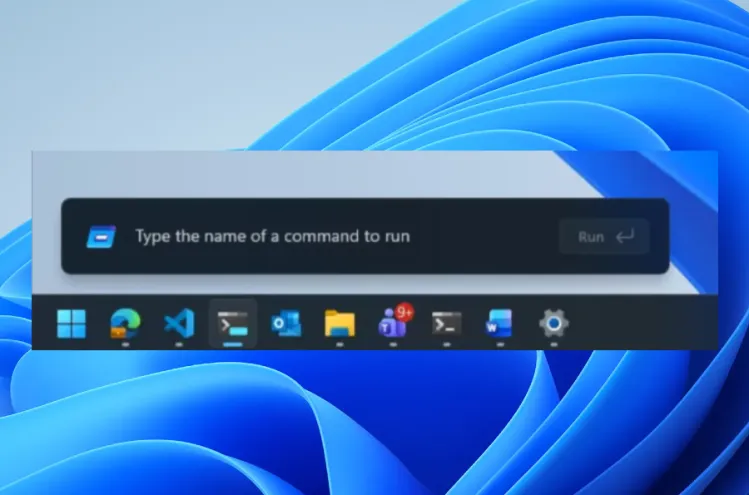
Windows has gone through complete redesigns across every major version since the 1990s. Windows 98, XP, Vista, 7, 8, 10, and 11 all looked dramatically different from what came before. Through all of them, the Run dialogue sat untouched. Press Windows plus R, get the same small box you have always gotten, since 1995. Until now.
Microsoft is testing a redesigned Run menu for Windows 11. Build 26300.8346, released to Windows Insiders in the Experimental channel on May 1, 2026, delivers the first major visual overhaul of the 31-year-old utility. The update adds dark mode support, trims the median load time from 103 milliseconds to 94 milliseconds, and removes the Browse button.
That Browse button data point deserves a second. Microsoft sampled 35 million users. Only 0.0038 per cent of them ever clicked Browse. That means for every 26,000 people who opened the Run dialogue, roughly one person used the button everyone else ignored. Microsoft cut it. In its place, the new tilde command sends users straight to their home directory. That mirrors standard command-line behaviour where the tilde symbol represents the home folder. Users who never touched Browse will never notice. Users who relied on it will need to adjust.
The redesign matches Windows 11’s current visual language. Microsoft updated the component to look like it belongs alongside the rest of the operating system rather than like a survivor from a previous era. The performance improvement is real, and the company says further gains will follow as platform-level optimisations develop.
The same Insider build ships several other changes. Windows Widgets now arrive with quieter default settings, reducing how aggressively they push content at users. File Explorer gets performance improvements targeting the sluggish click behaviour that users have complained about for years, particularly when navigating folders with many files, network locations, or cloud-synced directories. ShareSheet gets smarter app discovery for Azure Active Directory users. Magnifier controls now accept precise zoom percentage input.
Early community response to the Run dialogue changes landed positively. Users appreciate that Microsoft kept the core function intact while improving the aesthetics and the speed. That stands in contrast to the Start menu changes earlier in 2026, which drew more divided reactions because they consumed more screen space and disrupted established muscle memory.
The Experimental channel sits above Beta and Release Preview in Microsoft’s testing pipeline. General availability will take time. But the direction is clear. Microsoft is working through Windows piece by piece in 2026, and it just reached a corner of the operating system that three decades of redesigns had somehow left alone.