Claude Code and GitLab Integration Now Ships Code to Production

GitLab recently demonstrated how its integration with Claude Code helps teams move from AI-generated code to production-ready software faster and more safely. Claude Code already has a strong reputation among developers because it behaves like a senior engineer inside the terminal. It can explain unfamiliar code, suggest fixes, and scaffold features quickly. However, generating code and shipping reliable software are very different tasks.
That gap continues to widen as agentic coding tools improve. While developers generate code faster, bug backlogs grow, pipeline failure rates increase, and security vulnerabilities accumulate more quickly than teams can review them. The Claude Code and GitLab integration addresses this challenge directly.
Claude Code focuses on writing and updating code. Meanwhile, GitLab manages the rest of the software delivery lifecycle. The platform handles CI/CD pipelines, security scanning, code reviews, and approval workflows in one environment with a complete audit trail. As a result, teams can move from idea to production-ready deployment without relying on fragmented workflows.
GitLab highlighted three workflows that demonstrate how the integration works in practice. Each workflow targets a common engineering bottleneck.
In the first workflow, Claude Code fixes a C++ bug in an Arduino IoT sensor application that crashes whenever a USB device is disconnected. After developers apply the fix and push the code, GitLab automatically takes over. CI/CD pipelines validate the build, while security scans check for new vulnerabilities. In addition, the GitLab Duo Code Review Flow evaluates the update against coding standards and custom review instructions. Consequently, developers avoid manual handoffs between tools.
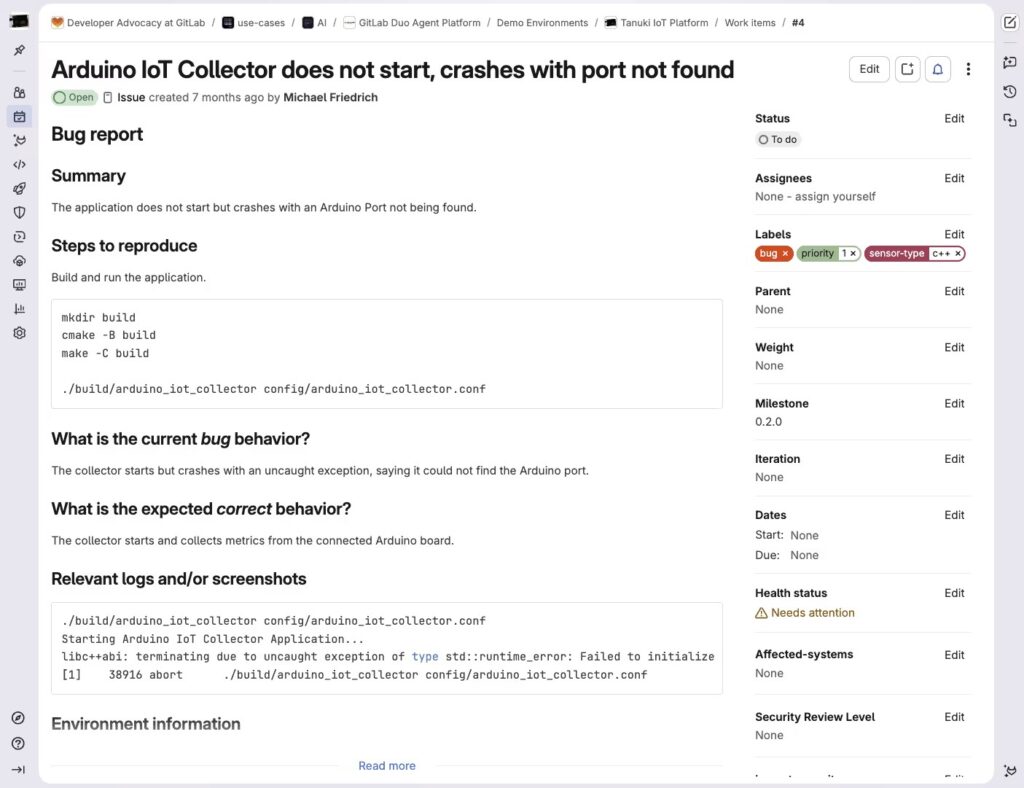
GitLab issue showing the Arduino IoT collector crash bug report
The second workflow introduces the GitLab MCP Server into Claude Code. Without MCP support, Claude only accesses local project files. However, MCP allows Claude to read real GitLab issues, debugging discussions, and historical merge request context directly from the repository.
Using MCP tools, Claude fetches the issue, analyzes the source code, applies the fix, and creates the merge request directly from the terminal. Therefore, developers no longer need to switch constantly between the terminal and browser. Once the merge request is created, GitLab automatically launches Advanced SAST for C++, CI/CD pipelines, and the Duo Code Review Flow simultaneously.
Security also plays a central role in the MCP workflow. Claude Code connects to GitLab through OAuth and operates under the developer’s existing GitLab identity. Because of that setup, the agent cannot access projects or data outside the developer’s permissions. Additionally, Claude requests user approval before executing MCP actions, which helps developers maintain full control over repository access and context retrieval.
The third workflow demonstrates Claude Code functioning as an external agent inside the GitLab Duo Agent Platform. In this scenario, a Spring Boot API server merge request already contains pending code review feedback. A developer mentions the Claude Code Agent directly in the merge request comments, which immediately triggers an agent session in the background.
The agent reviews the feedback, applies the required fixes, commits the changes, and posts a summary comment automatically. Meanwhile, the development team continues handling approvals, pipeline warnings, and security findings through existing review processes such as SAST Vulnerability Resolution and Code Owners approval gates.
GitLab also allows teams to refine agent behavior through a project-level AGENTS.md file. Teams can use this file to instruct agents to run local builds before committing changes, keep modifications minimal, or automatically create merge requests after successful pushes. Furthermore, both Claude Code and the Duo Agent Platform process these custom instructions consistently across workflows.
The Claude Code and GitLab integration is available now. Teams that have not adopted GitLab Duo Agent Platform can begin with a free trial. In addition, existing Premium and Ultimate subscribers can enable Duo Agent Platform and use the GitLab Credits included with their subscriptions.
Ultimately, all three workflows follow the same principle: Claude Code accelerates development, while GitLab validates, secures, and certifies the work before production deployment.